Considering just how crucial the Internet is to everyday life, and how much all students are expected to be digitally fluent, it makes perfect sense to teach everyone the fundamentals of web languages and the history of the internet. However, I do find that some of these methods seem a bit outdated. Of course, I know websites still use these languages, it’s just that most people will not necessarily encounter the need to know HTML, CSS, or JavaScript. Of course, that’s not saying there’s no value, but it doesn’t feel quite as crucial as some may make it seem.
Most websites and general online platforms that people use are accessible to those who have no coding experience, and that’s how they’re created. There is an element to this, somewhat inspired by Julien Lucas’ article on Tim Berners-Lee, that might complicate things. Having digital independence, in terms of being able to create and access digital information without relying on large companies to do the work, might be a good idea in terms of privacy. As Berners-Lee emphasizes, “this is for everyone,” and so, people should have control over the systems in place that can help them. AI complicates this, of course, because some people might prefer having AI code for them rather than doing it themselves. Lucas quotes Berners-Lee’s book, where he essentially says there’s time to make AI systems that serve and protect humans. But Lucas notes,
“It’s a moving vision. But it’s hard to reconcile with the entropy of today’s online world, where all that’s solid melts into air, and every protocol is profaned.”
Julian Lucas, “Tim Berners-Lee Invented the World Wide Web. Now He Wants to Save It,” Annals of Technology, The New Yorker, September 29, 2025.
In some ways, that almost encourages me to agree that students should learn these key languages and Internet histories. It provides a solid foundation of knowledge, where if all else fails, individuals still have the capacity to participate digitally.
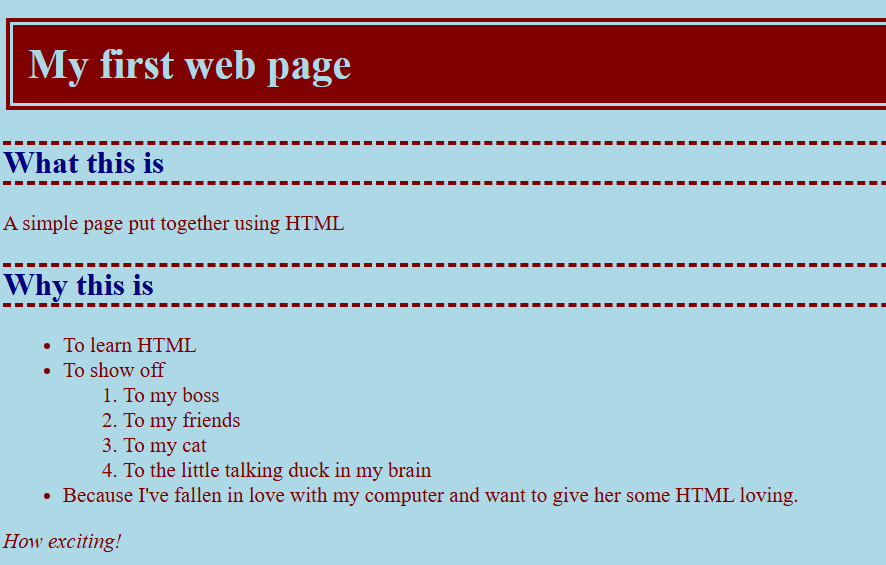
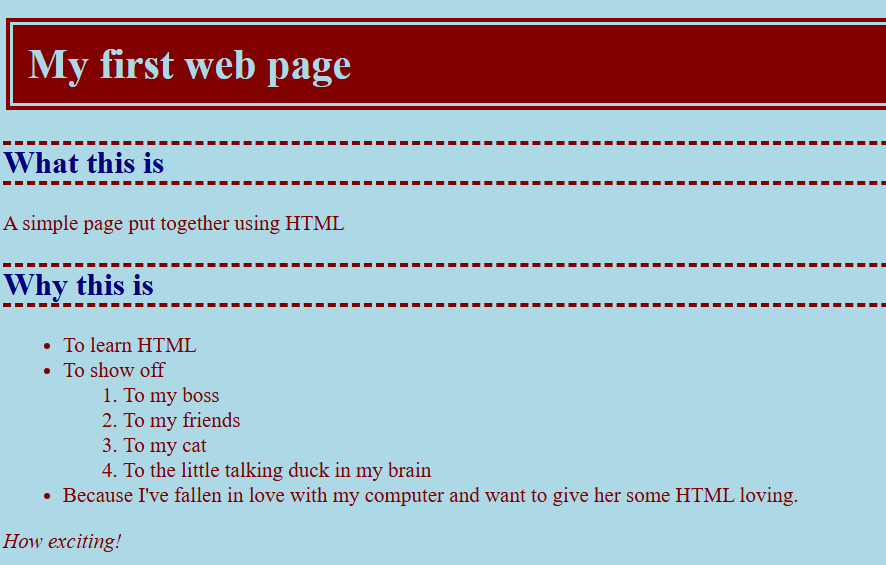
Personally, I only have very specific coding knowledge. I have basic Python knowledge from Intro CS, and over the summer I worked using MATLAB to build a psychological experiment. HTML and CSS, the two platforms I focused on for this assignment, are entirely new to me. As such, I started with the beginner tutorials, but I did find that they were quite easy and accessible. I don’t even think that’s because I’m generally familiar with coding; I think it’s because the languages are fairly straightforward. Once you understand the fundamentals, you’re able to mess around a bit and personalize the website the way you want, especially with CSS from a design standpoint. I could’ve spent a long time writing out a site that looked exactly how I wanted, but I just messed with a few colors and borders to get something a bit aesthetically pleasing to me. It was a really quick process, which also supports my position above; people can obtain a baseline knowledge fairly easily, which opens up their ability to have digital independence. Below are both my HTML and CSS files, which create a completely pointless but somewhat good-looking site (in my opinion).
<!DOCTYPE html>
<html>
<head>
	<title>My first web page</title>
	<link rel="stylesheet" href="style.css">
</head>
<body>
	<h1>My first web page</h1>
	<h2>What this is</h2>
	<p>A simple page put together using HTML</p>
	<h2>Why this is</h2>
	<ul>
		<li>To learn HTML</li>
		<li>To show off
			<ol>
			<li>To my boss</li>
			<li>To my friends</li>
			<li>To my cat</li>
			<li>To the little talking duck in my brain</li>
			</ol>
		</li>

		<li>Because I've fallen in love with my computer and want to give her some HTML loving.</li>
	</ul>
	<p><em>How exciting!</em></p>
<h2>Where to find the tutorial</h2>
<p><a href="http://www.htmldog.com"><img src="http://www.htmldog.com/badge1.gif" width="120" height="90" alt="HTML Dog"></a></p>
<table>
    <tr>
        <td>Row 1, cell 1</td>
        <td>Row 1, cell 2</td>
        <td>Row 1, cell 3</td>
    </tr>
    <tr>
        <td>Row 2, cell 1</td>
        <td>Row 2, cell 2</td>
        <td>Row 2, cell 3</td>
    </tr>
    <tr>
        <td>Row 3, cell 1</td>
        <td>Row 3, cell 2</td>
        <td>Row 3, cell 3</td>
    </tr>
    <tr>
        <td>Row 4, cell 1</td>
        <td>Row 4, cell 2</td>
        <td>Row 4, cell 3</td>
    </tr>
</table>
</body>
</html>
body {
font-size: 14px;
color: maroon;
background-color: lightblue;
font-family: serif, helvetica;
}
h1 {
color: lightblue;
background-color: maroon;
padding: 10px;
border-style: double;
border-color: lightblue;
border-width: 7px;
}
h2 {
color: navy;
font-size: 1.5em;
border-style: dashed;
border-width: 3px;
border-left-width: 0;
border-right-width: 0;
border-color: maroon;
}
img {
border-style: inset;
border-width: 10px;
border-color: lightblue;
}