Today we are going to tackle two of the newer areas of inquiry for the Digital Arts & Humanities: image analysis and artificial intelligence. The past few years have seen an explosion of interest in both due to recent increases in the processing power of computers, the sophistication of machine learning algorithms, and the intense reaction and even backlash against the frightening dystopian futures these developments make possible. Political races rigged by Deep Fake misinformation videos putting words into candidates mouths? Artists no longer able to make a living since AI art generators can produce passable imitations of their work without permission for essentially zero cost?
This is not the future we were promised.
One of the biggest current debates in the field — and the culture at large, for that matter — is whether these developments are a net good or evil, and what the appropriate responses should be. In the spirit of not accepting black boxes and peeking under the hood that informs this class, we are going to inform our own views on this debate through gaining a practical understanding of a small subset of these tools: the IIIF standards for sharing images online and AI tools to colorize and otherwise analyze black and white images. We’ll use these to make AI manipulated versions of black and white photos in the Carleton College Archives Digital Collections and wrestle with the ethical concerns the exercise raises.
In order to use the process ourselves, we need to get a high resolution version of a Carleton College historic image, and to do that, we need to first take a detour into the wild world of the International Image Interoperability Framework.
International Image Interoperability Framework (triple-eye-eff)
The International Image Interoperability Framework or IIIF is a community of people developing a set of open standards for sharing high-quality, scalable images and other digital objects online. The aims are to break through silos by encouraging everyone to adopt standards that presume their images will be linked, viewed, zoomed, annotated, and repurposed, without the need to make redundant copies or negotiate paywalls and copyright notices. IIIF Images allow for the creative mixing and annotating of content on the web and open exciting new possibilities for image-based projects that are only just beginning to be realized.
Check out some of the demo projects highlighted on the IIIF home page to see what the community is up to.
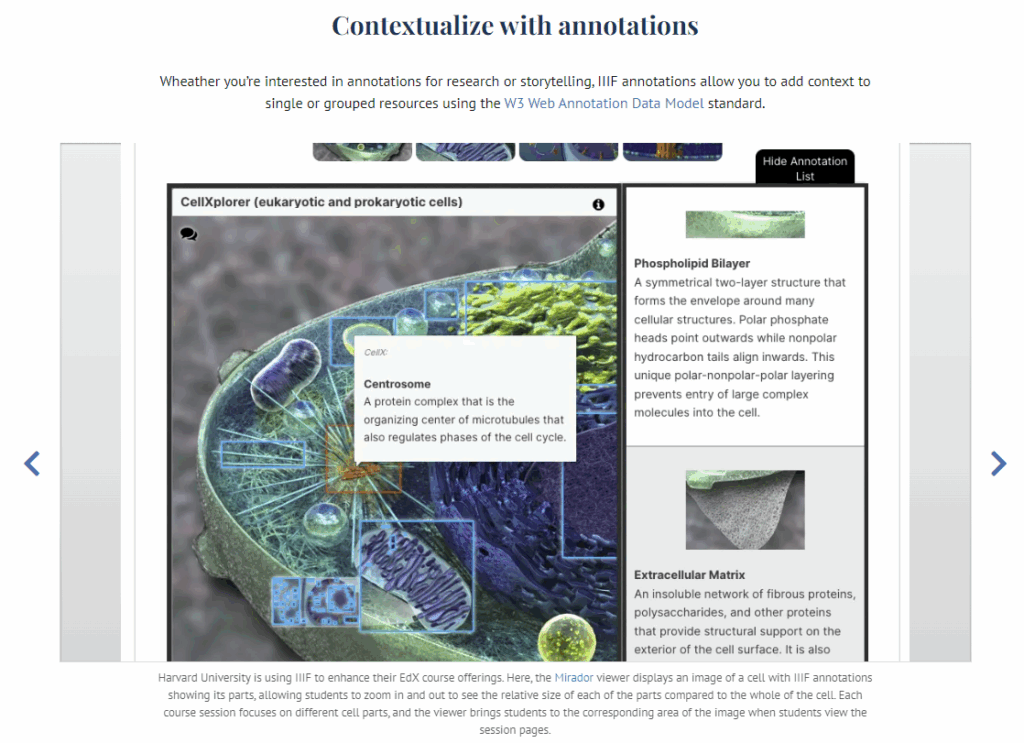
In-class Exercise: The Image API
In practice, IIIF consists of a series of APIs (Application Programming Interfaces) for hosting and viewing images and other audio/visual materials on the world wide web. We will focus on the Image API today to see how we can take an image shared by Carleton’s archives and repurpose it for a different use case.
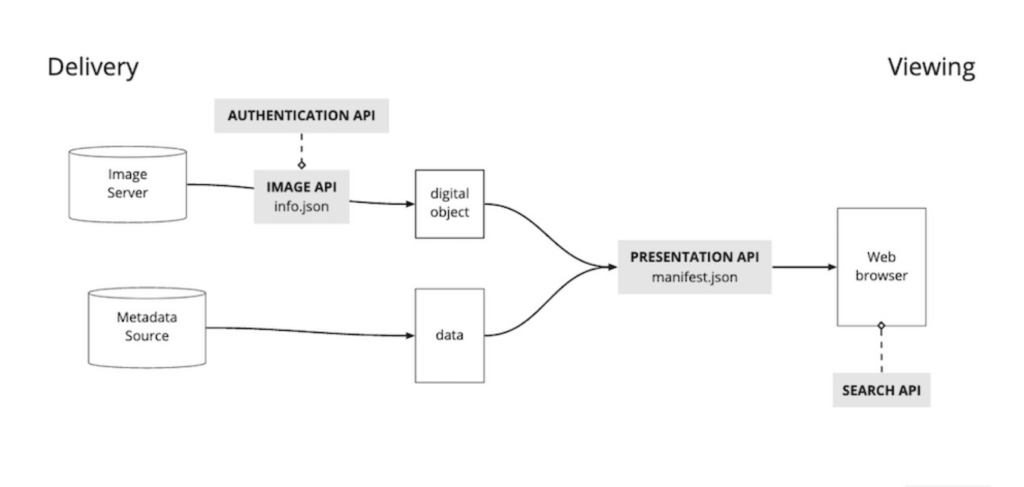
The IIIF Image API solves the problems of needing high resolution images for close study that also load quickly and work well on the web by providing:
- A standard URL structure for accessing images (and therefore easy to support)
- Enough information to allow others to easily develop zoom viewers and other tools
- Cacheable and Scalable URLs
- Human hackable URLs
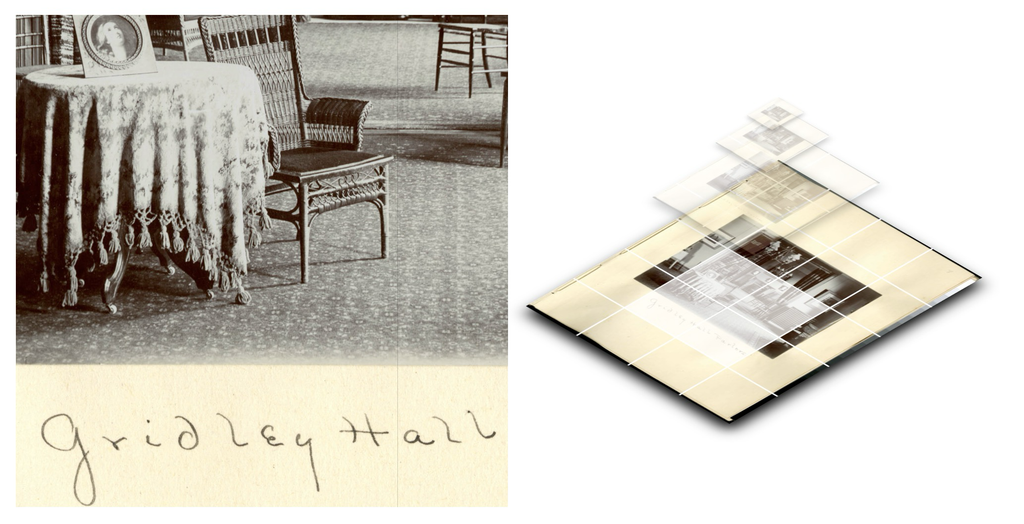
Source: IIIF Image API Tile Pyramid by Allmaps
This last element is quite helpful and will make our task easier today. The basic URL structure contains a predictable format with set parameters we can change manually to get display variants of the image live in the browser. The template for a IIIF Image API request looks like this
TEMPLATE: {scheme}://{server}{/prefix}/{identifier}/{region}/{size}/{rotation}/{quality}.{format}

EXAMPLE: https://example.org/image-service/abcd1234/full/max/0/default.jpg
One we have the identifier for a given image, we can play around with the other parameters to return a certain region of the image (i.e. cropping), a different size (scaling), any 360 degree rotation, an alternative quality of the image (e.g. color, grayscale or black and white, if provided by the host), and a different image format (gif, jpg, png, tif).
To see how this works:
- Open the free IIIF Image Inspector tool and load one of its example images, like Canvas of Cornfields at Sunset
- Click the OPEN button to see what it looks like with the defaults
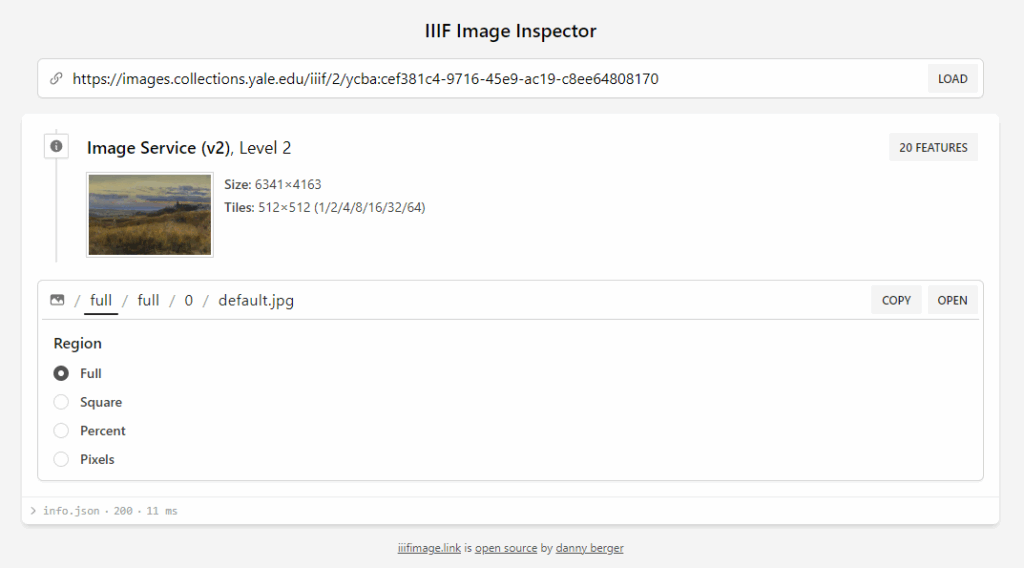
- Now use the options below the image to construct a URL that shows an image that is, for example:
- square cropped
- 512px wide
- upside down
- gray scale
- has a format of png
- OPEN the new image and compare the two tabs
The amazing thing here is that you didn’t need to download and open the image in a third party image editing app to do any of that. It happens in the browser purely by manipulating the URL!
Leave the Image Inspector open, since we’ll come back to it soon.
In Class Exercise: Colorized IMAGES of Historic Carleton
To see how these tools work together, we’re going to create a collection of AI colorized versions of black and white images of Carleton interiors in days gone by, to try to get a better sense of the lived experience of past students.
The inspiration for this exercise is a fantastic project from the Ghent Center for Digital Humanities looking at exploring the art history of domestic interiors through colorized forensic Belgian crime scene photographs: CRIME SCENES: Interbelluminterieurs in België door de lens van de forensische fotografie.
We’ll use the same tools they used (DeOldify, IIIF, and Omeka) on a selection of images from Carleton that show interiors — though not (as far as I know) crime scenes!
Carleton College Archives Photos and IIIF
A nice thing about the IIIF standard is that a lot of tools are starting to incorporate it out of the box.
Carleton uses a CMS called CONTENTdm to store some of its digital collections, and it (being a product of library-land from the folks who brought you WorldCat) supports IIIF images natively. Because of that, we can get the URL of images in our collection and use our knowledge of the IIIF Image API to get the best resolution version we can for colorizing.
Process Overview
Here are the steps we are going to follow to explore the ethics of using AI on historic Carleton photos:
- Find an image record of a page in a historic scrapbook or album from our CONTENTdm catalog
- Get the IIIF image URL to that image using your DevTools inspector skills
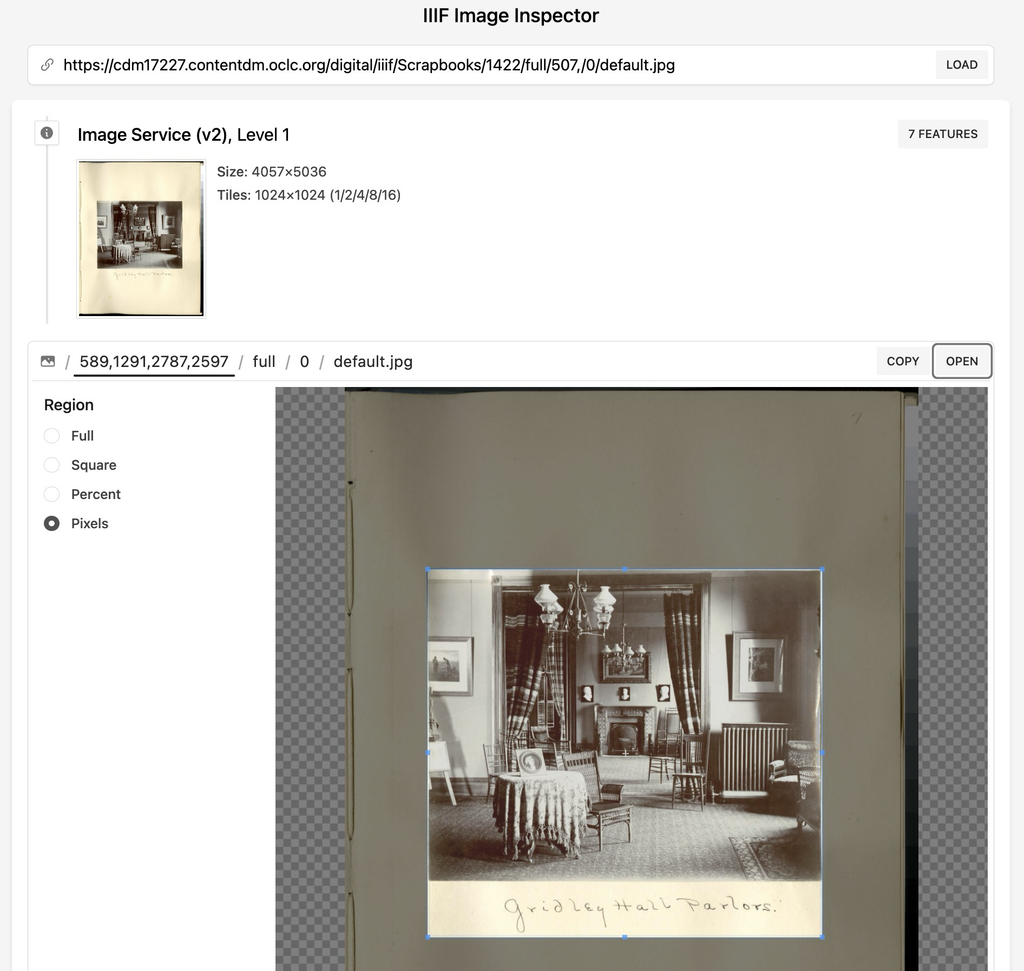
- Use the IIIF Image Inspector tool to get a full-size IIIF URL to the full region, full size, default quality jpg of the image (or a smaller cropped region, if pasted in a scrapbook).
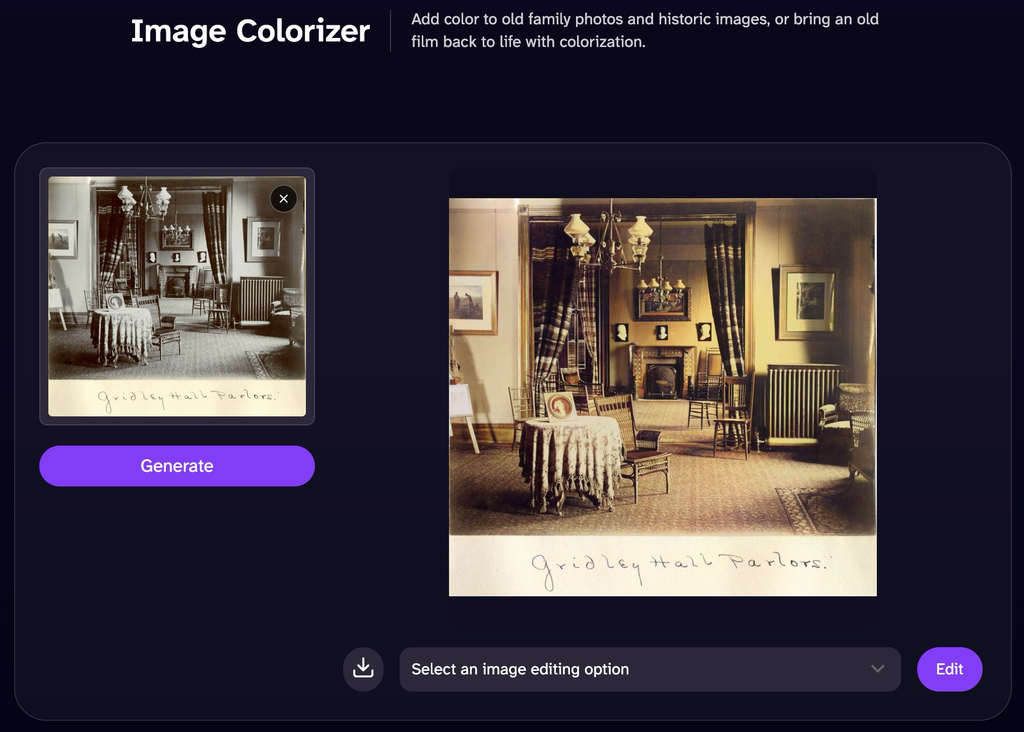
- Use the DeOldify AI colorizer to create a colorized variant of the image
- NB: DeOldify is an open-source AI image manipulation tool that has already been deprecated. First, check out the archived Github Repository for DeOldify and quickly scan through the examples and documentation offered here.
- Use the Distant Viewing Explorer to test other AI models on your image
- Add the colorized version, the original, and some experimental outputs from Distant Viewing Explorer to your WP blog post along with your reflections on the ethics of AI image manipulation
1. SOURCES: The Archives Collection
The button and image below link to a search of Carleton’s Digital Collections for the Scrapbook and Photo Albums collection
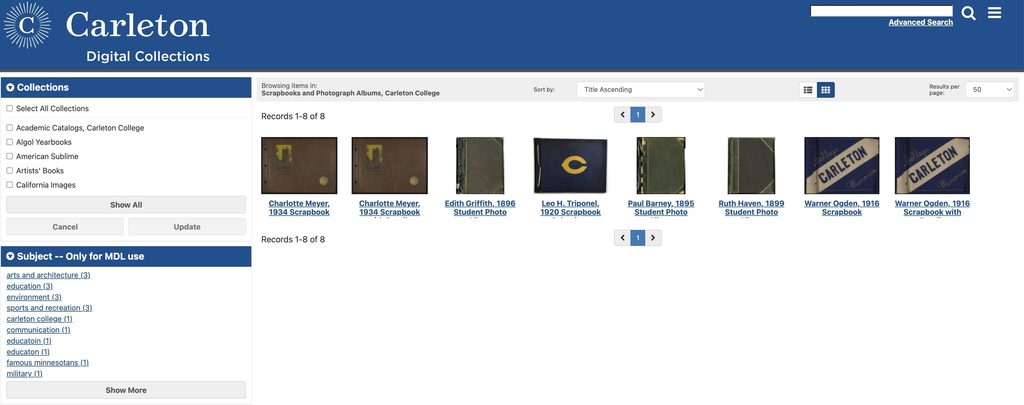
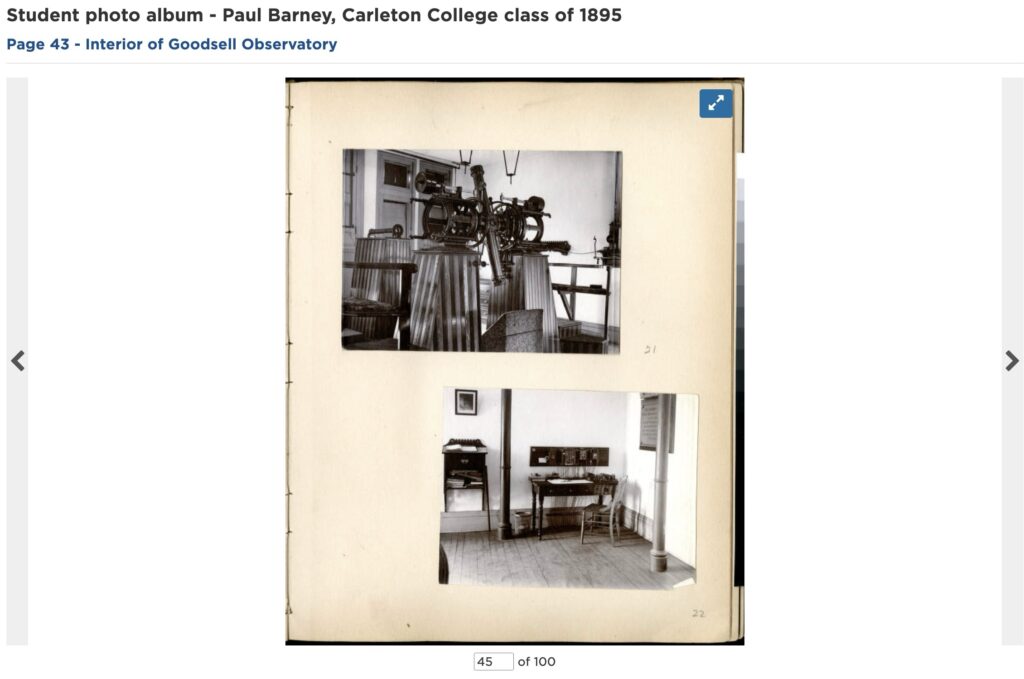
Look through the scrapbooks and albums, which contain many images pasted onto larger pages, like the one at right
With IIIF, we can crop and rotate these fairly easily to get clean versions of an image you want to work with
2 PROCESS: IIIF Image URL
Carleton’s ContentDM doesn’t expose the IIIF URL in the right api format for us, so we need to use our DevTools web inspector to get it.
To do this, we’ll use the Network Tab, which monitors all page load activities, like loading an external image URL
SAMPLE IMAGE:
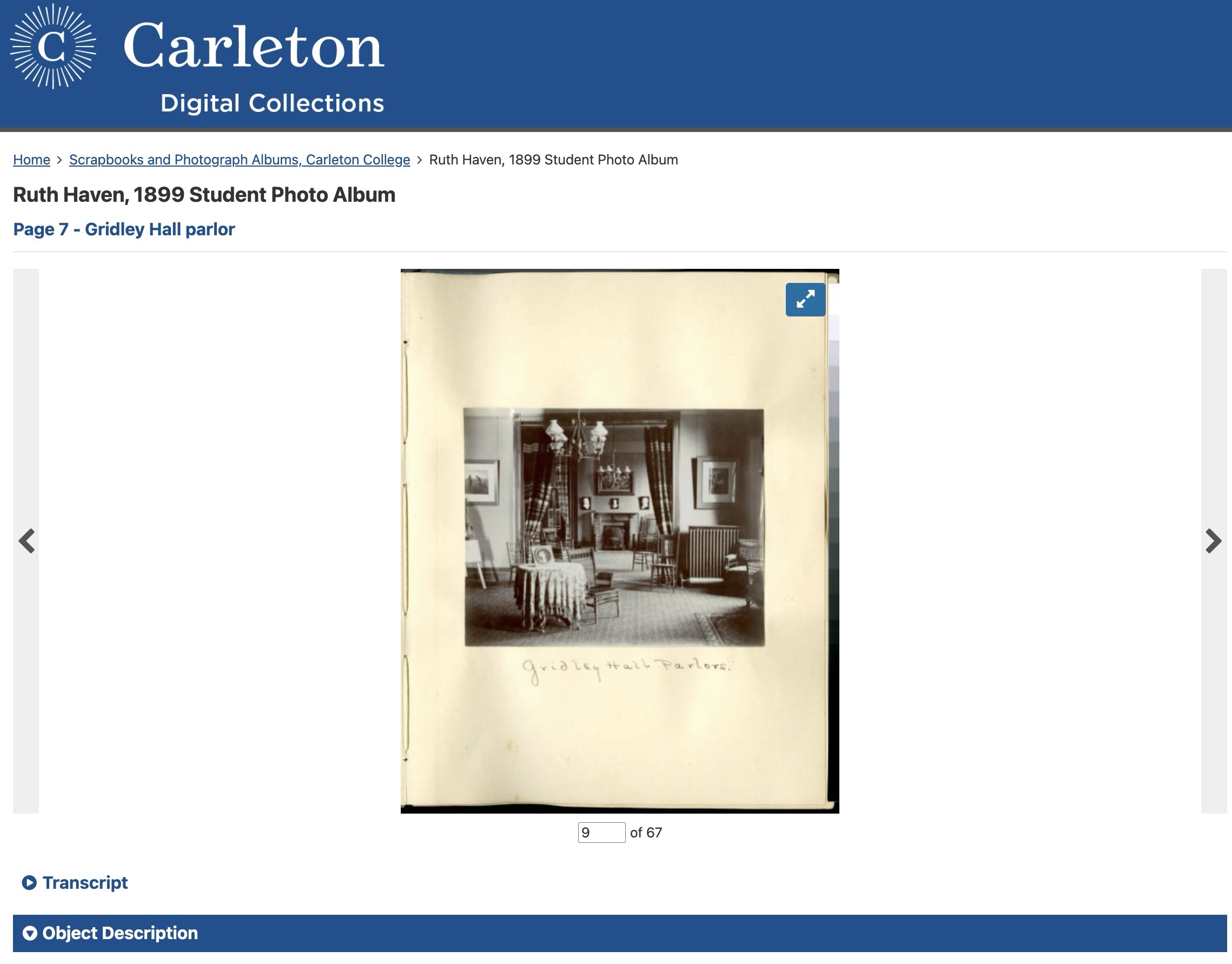
Here’s the image I chose from the collection to demonstrate the steps of this exercise:
Ruth Haven, 1899 Student Photo Album Page 7 – Gridley Hall parlor
IIIF IMAGE URL
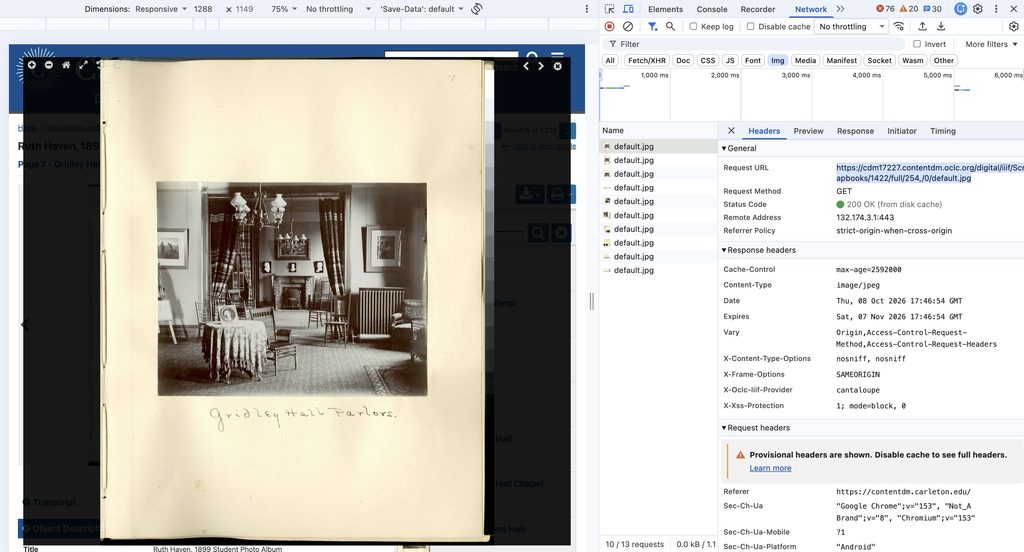
- Open DevTools and go to the Network tab (see image below)
- AFTER Opening the Network tab, click on the image to open it in the ContentDM IIIF viewer so you can get the full IIIF URL for the image
- Optionally click the Img filter to more easily find the right URLs for the default.jpg file (see image)
- Click on the default.jpg file and you should see the Request URL: in the Headers tab.
Copy the Request URL to your clipboard, which should look something like this: https://cdm17227.contentdm.oclc.org/digital/iiif/Scrapbooks/1422/full/254,/0/default.jpg


3 PROCESS: IIIF Image Manipulation
We will know use our knowledge of the IIIF Image API to get a high resolution, cropped version of the image.
FULL SIZE IIIF URL:
- Reopen the IIIF Image Inspector tool
- Paste the IIIF link in the tool to validate you got a working link
- Change the size parameter to get the full resolution image, e.g.
https://cdm17227.contentdm.oclc.org/digital/iiif/Scrapbooks/1422/full/full/0/default.jpg - In the Region setting, click pixels and drag the box around your desired image to crop it
- If necessary, adjust the rotation parameters to get a clean image
- Open to see the clean IIIF image

4 PROCESS: Colorize with DeOldify
To use DeOldify, you have to run a series of python scripts. Some of you could do that, but the overhead of teaching it and setting up all your laptops is too high for this class.
We used to use an Image Colorizer Google Colab notebook to create a colorized variant of your image, which let us use a virtual cloud environment entirely in the browser. Sadly, that is now broken and no longer supported.
Instead, we’ll use the version of the tool that has been hosted on DeepAI here. DeOldify Image Colorization on DeepAI
Download the output to use in your posts and future experiments
ETHICAL CONSIDERATIONS
We want to make it clear that AI tools did this work, so:
- Make sure you add a “created/manipulated/colorized/etc by AI” statement to any outputs you share.
- Explore what (if any) options the tool lets you set and share them as part of your methods.
Exploring Other AI Image Analysis Tools
Lauren Tilton and Taylor Arnold have been at the forefront of image analysis with AI through their Distant Viewing Lab, at the University of Richmond, which uses and develops computational techniques to analyze visual culture on a large scale.
Last year, with the help of new tools that let you run AI models directly in the web browser, they launched the Distant Viewing Explorer. This suite of tools is “free, open-source, web-based software designed to help anyone apply state-of-the-art AI algorithms to study visual and multimodal collections.”
Click the image below, explore the site, and try out several of the image manipulation tools with the sample image sets to see how they work.
Image analysis of Carleton Content
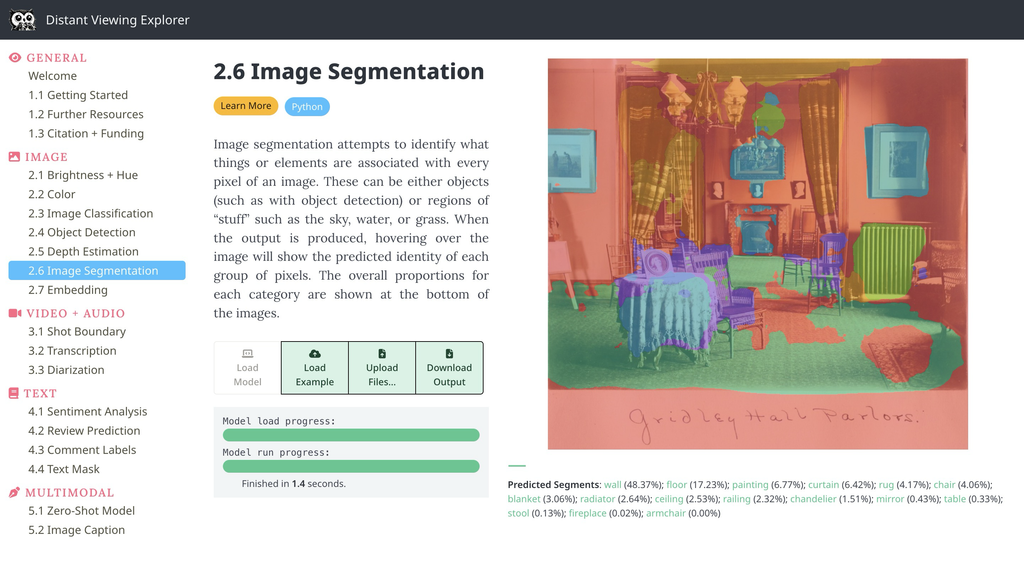
- Find the IIIF URL of your image from the Carleton archives, and paste it in the Upload Files of the tools to see what insights you might gain by using this on historical data.
Suggestions:
- Paste the IIIF url (and then upload the colorized image to compare results) for the following tools
- Image Classification
- Object Detection
- Image Segmentation
- Click the Learn More and Python buttons on each tool to try to understand what the model is doing
For inspiration, explore the website below that uses the Image Classification and Object Detection models to make the image set searchable by content, not just human supplied metadata.
Lab Assignment (due Sunday)
Your assignment for this week is to think about how easy it now is to use AI to create colorized images, and other variant images, and use that process to reflect more broadly on the issues raised by the readings.
- Write a post that raises at least one ethical issue arising from the combination of artificial intelligence and image manipulation.
- Include at least two quotations from the readings that help you think through or position your argument.
- Illustrate your post with a comparison of your original, colorized, and at least one output of Distant Viewing Explorer images from today’s exercise
Post to Moodle as Lab Assignment Week 4